
Truck Manager V5.7.0
A Windows desktop utility for Euro Truck Simulator 2 and American Truck Simulator, developed by Cortex Studios.
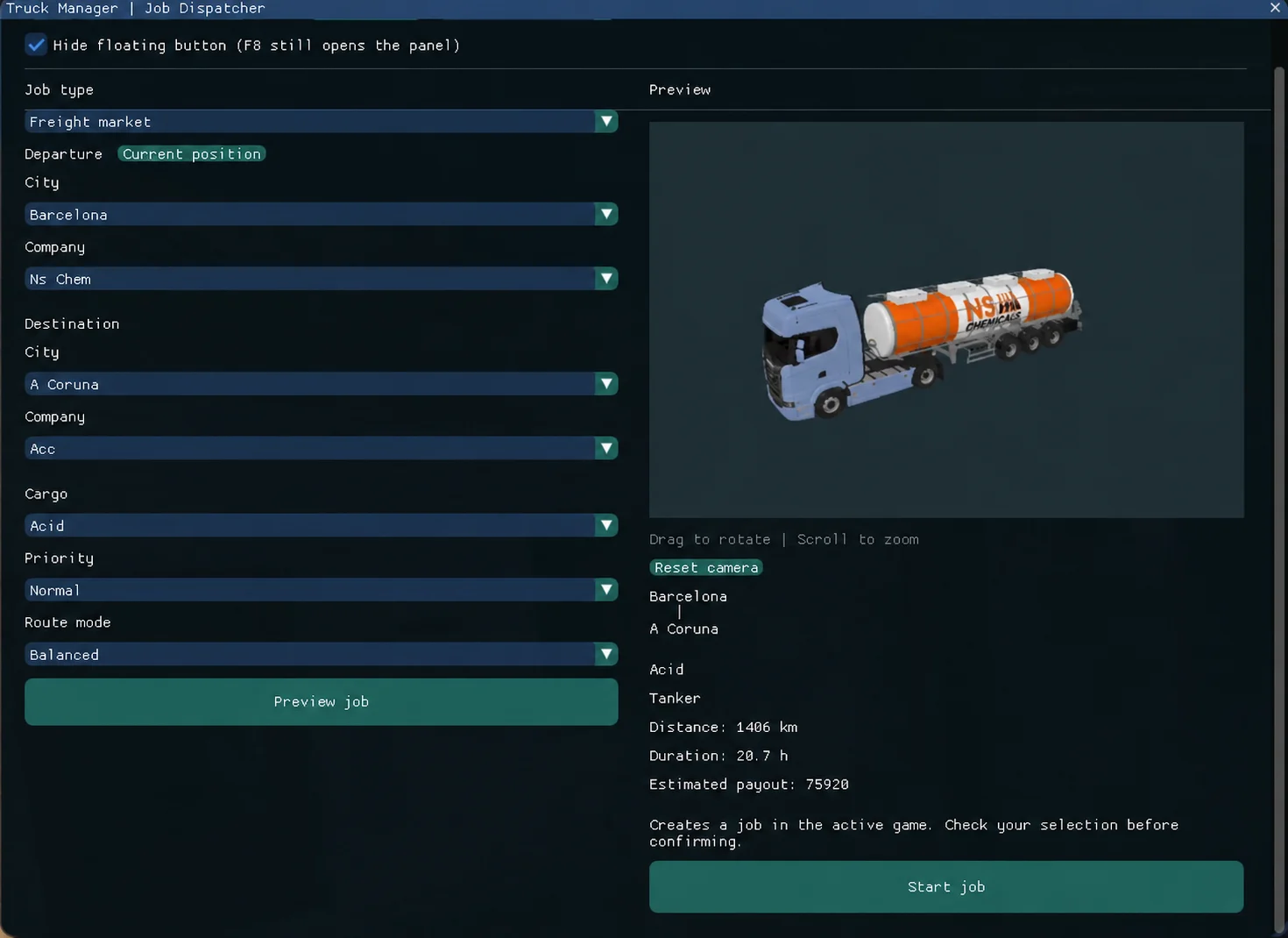
F8 JOB DISPATCHER
– Create deliveries from the desktop or the in-game F8 panel.
– Company trailers, your own attached trailer and Quick Jobs.
– Choose departure, company, destination and cargo, with 3D previews.
– Use the current location at a recognised company or select the departure manually.
– Deliver between different companies in the same city.
– Prepare map data from your installed game and supported expansions, including ProMods. Available cities and companies depend on the active profile, save and installed mods.
OTHER FEATURES
– Mod load order organisation and presets. Presets do not download mods.
– Profile Editor for supported profile and save values.
– Steam Cloud profile support, with limitations for some functions.
– System tray operation and improved automatic connection recovery.
V5.7.0 IMPROVEMENTS
Expanded F8 dispatcher, improved Quick Jobs, map expansion data handling, faster resource preparation and profile editing, and fixes for same-city deliveries and interface spacing.
INSTALLATION
1. Download Truck.Manager.exe (normal V5.7.0 edition, not beta).
2. Place it in a folder and run it on Windows. No separate Python installation is required.
3. Select your game and profile and complete resource preparation in the desktop Job Dispatcher.
4. Launch the game with the matching profile and press F8. If map data is outdated, prepare the resources again in Truck Manager.
This is a desktop utility, not a .scs mod: do not put the executable in the game mod folder. Back up your saves before editing them. Compatibility depends on game version and mod combination; future game updates may require a Truck Manager update. Some features require verified access.
Official release: https://github.com/cortexstudiosinfo/ETS2-MOD-MANAGER-UI/releases/tag/V5.7.0
Guide (English / Spanish): https://github.com/cortexstudiosinfo/ETS2-MOD-MANAGER-UI#readme
Support: https://forum.scssoft.com/viewtopic.php?t=352761
Yorumlar (0)
Üyeliksiz Yorum YapabilirsinizBu mod için henüz yorum yapılmamış. İlk yorumu siz yazın!