
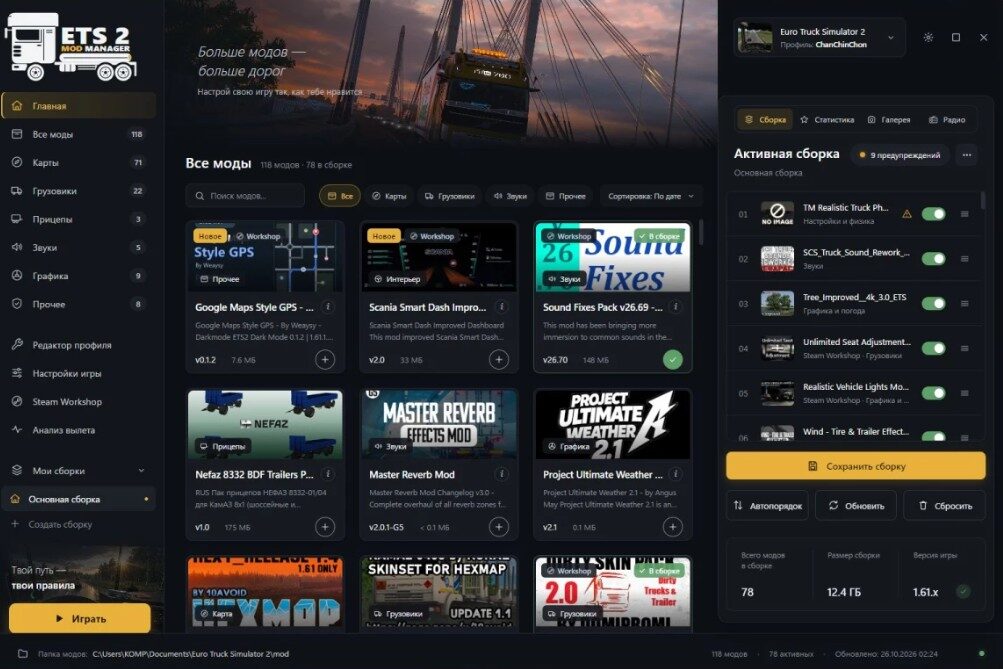
This tool displays all mods from your local game folder and the Steam Workshop, automatically arranges them in the correct load order, and identifies the causes of game crashes.
It includes a profile editor and game settings management.
The interface is available in both Russian and English.
Unified Mod Library. The manager detects everything at once both local files from your ‘mod’ folder and subscriptions from the Steam Workshop. It displays previews, file sizes, versions, and descriptions. Everything is neatly organized into categories: maps, trucks, trailers, sounds, and graphics. New mods are highlighted with a “New” tag.
Smart Auto-Ordering. No more manually moving dozens of files into your mod folder; the manager organizes everything for you with a single click.
Profile Statistics. Track your total distance driven, deliveries, fuel consumption, fines, accidents, playtime, and more all presented clearly in one place.
Screenshot Gallery. View ingame screenshots from all your profiles, with a full-screen viewing option.
Radio Station Editor. Add, modify, or remove radio stations, mark your favorites, and listen to them directly within the manager.
Build Validation. The launcher provides real-time alerts regarding version incompatibilities, duplicate files, incomplete map sets, orphaned map connectors, and direct conflicts between mods.
Crash Analysis. The tool reads your game logs to pinpoint the cause of a crash whether it’s a specific mod, a plugin, a driver issue, or a lack of memory. For common issues, a one-click fix is available.
Built-in Save Editor. All the essential features of the TS Save Editor are integrated directly into the manager. You can adjust your funds, experience, level, skills, and ADR certifications, instantly repair and refuel your vehicle, unlock cities, and purchase garages. Game Settings: One click game optimization, custom Steam launch parameters, clearing of caches and logs, and verification of game file integrity.
Mod Set Sharing: Share your mod set with a friend via a short code or a `.tmod` file. When importing, the manager will automatically identify any missing mods.
Restore Points and Profile Cloning: Safely test new maps or experimental mods. You can easily create a backup or a clone of your current profile before trying something new.
Easy Installation (Drag-and-Drop): Simply drag and drop `.scs` files, `.zip` archives, or mod packs directly into the manager window it will automatically unpack and move the files to the game’s working directory.
Hotkeys: Use your keyboard for quick searches, saving mod sets, rearranging mods, and launching the game perfect for those who value speed and convenience.
How to Use:
Launch the manager; it will automatically detect your game, profiles, and mods.
Select a profile from the top-right corner.
Add mods to your set using the “+” button; click the “i” icon on a mod card to view its description.
Click “Auto-sort” and check for any warning icons above your mod set.
Click “Save Mod Set,” then select “Play.”
If the game crashes, use the “Crash Analysis” feature.
Installation Instructions:
Download the installer: `ETS2-Mod-Manager-Setup-0.0.1.exe`
Run the file. If a “Windows protected your PC” window appears, click “More info” → “Run anyway.” This message occurs because the software does not yet have a paid digital signature.
Choose an installation folder; shortcuts will be created on your desktop and in the Start menu.
You’re all set! Before experimenting with heavy maps, I recommend creating a profile restore point under the “Game Settings” → “Profiles and Backups” tab.


Yorumlar (0)
Üyeliksiz Yorum YapabilirsinizBu mod için henüz yorum yapılmamış. İlk yorumu siz yazın!